
Comparison 13 min read
Seven apps that teach from real shows
You opened Netflix to practice French, watched an episode, and caught maybe one word in five. The gap between watching and learning is an app problem, and this guide closes it. We ranked the best language immersion apps by a single measurable standard: how much real-show learning each tool delivers when you point it at the shows you already watch.
You opened Netflix to practice French, watched an episode, and caught maybe one word in five. The gap between watching and learning is an app problem, and this guide closes it. We ranked the best language immersion apps by a single measurable standard: how much real-show learning each tool delivers when you point it at the shows you already watch. This comparison is built from the workflows each vendor documents and public pricing pages reviewed in November 2026. Where a claim could not be verified, the card says so.
The full ranking method comes first, then a comparison matrix, then one honest card per tool with verified prices as of November 2026, including for the free ones.
One shortcut before you read: the Loqua Chrome extension is free to install, and the free plan covers daily practice. It works on Netflix, YouTube, Prime Video, and Crunchyroll, and saves each word with audio and screenshot in one click. Install the free Loqua extension.
How we ranked immersion (measurable criteria)
Roundups tend to call any app with a video clip immersive. We wanted a definition a reader can verify in five minutes, so this page defines immersion language learning with five yes/no checks, and every app answers the same five questions. In plain terms, what is a language immersion app? An app that teaches from content made for native speakers and gives you the tools to understand and remember words from that content, inside the content.
What makes an app a real immersion app?
- It teaches from real shows you pick, on services you already pay for.
- You can click any word for a definition.
- You can mine the sentence with audio and screenshot in one click.
- It reviews what you mined, with a built-in spaced repetition system.
- It works on mobile.
A drill-only app scores 0 or 1 out of 5, because scripted lessons never touch material you chose. Each check exists for a reason. Real shows keep vocabulary colloquial, the way people actually speak in 2026, with slang and speed intact. Click-lookup keeps you in the flow: checking a dictionary app in split screen costs about thirty seconds per word, and long pauses kill the watching. One-click mining with audio and screenshot preserves context, so the sentence you review tomorrow is the scene you remember today. A built-in review system turns mined sentences into scheduled repetitions instead of a bookmark graveyard. Mobile reach matters because half of your watching and reading happens on a phone.
We scored all seven apps against these checks from their documented behavior, then verified prices at each tool's official pricing page in November 2026. Where a price came from a third-party page, the card says so and tells you to re-check before paying.
Comparison matrix: all 7 apps at a glance
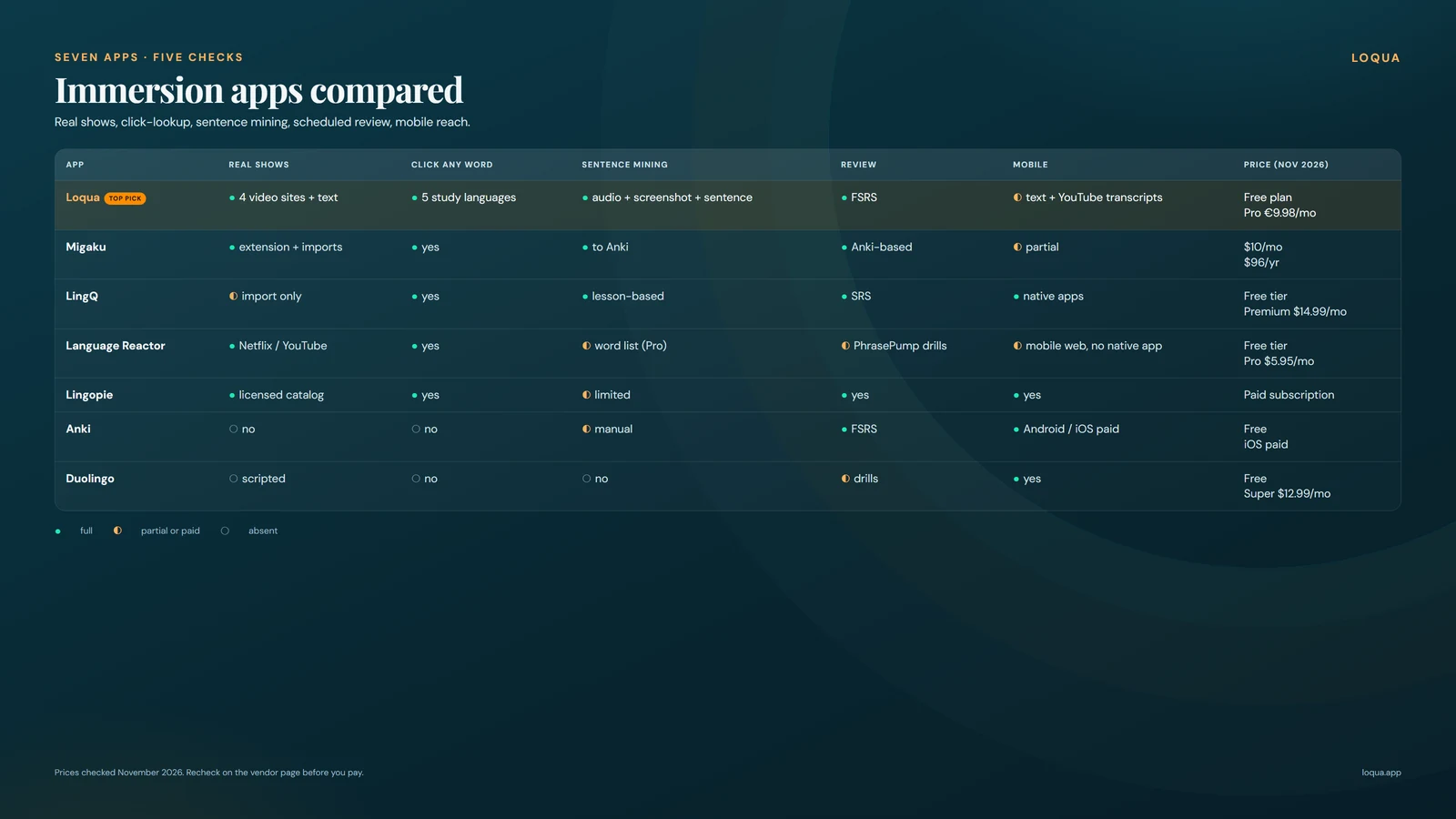
When you compare immersion apps, the five checks matter more than any feature list, because they decide whether the time you spend watching converts into learned words or stays entertainment. The first three columns measure input: real content, instant definitions, fast capture. The last three measure what sticks and where: review, mobile reach, and cost. Prices are listed as of November 2026 and sourced in each card below.
| App | Real shows | Click-any-word | Sentence mining | Review system | Mobile | Price (as of Nov 2026) |
|---|---|---|---|---|---|---|
| Loqua* | Yes: Netflix, YouTube, Prime Video, Crunchyroll, text sites | Yes, in all 5 study languages | Yes: audio + screenshot + sentence | Yes: FSRS | Partial: text sites + YouTube | Free plan |
| Migaku | Yes: via extension and imports | Yes | Yes: to Anki | Yes: Anki-based | Partial | From $10/mo |
| LingQ | Imported content only | Yes | Yes: lesson-based | Yes: SRS | Yes | Free tier; Premium from $14.99/mo |
| Language Reactor | Yes: Netflix, YouTube | Yes | Limited: word list (Pro) | Limited: PhrasePump drills | Web app; no native app | Free tier; Pro ~$6/mo |
| Lingopie | Yes: built-in licensed catalog | Yes | Limited | Yes | Yes | Paid sub, free trial |
| Anki | No | No | Manual | Yes | Yes | Free; iOS app paid |
| Duolingo | No: scripted lessons | No | No | Drills only | Yes | Free; Super ~$13/mo |
* Disclosure: Loqua makes this page. We scored it with the same five checks as every other tool, and its card below keeps its real limits visible: five study languages and desktop-first video.
The 7 apps, reviewed
Each card names who the tool fits, how it scores on the five immersion checks, two honest pros, two honest cons, the verified price, and platforms. Prices are as of November 2026.
1. Loqua
Disclosure: Loqua makes this page. It sits first because it passed all five checks in the November 2026 review, and its cons get equal space.
Best for: learning from the shows you already chose, in English, French, Spanish, Italian, or Portuguese.
The Loqua Chrome extension is free to install, and the free plan covers daily practice. On desktop it covers Netflix, YouTube, Prime Video, and Crunchyroll, plus text sites. Click any word while watching or reading and a definition appears in your language. Loqua writes definitions in the language you think in, across all five study languages. One click saves the sentence, the audio at that moment, and a screenshot of the scene to Anki or to Loqua cloud, which syncs across devices: sentence mining with Anki, done.
Review runs on FSRS spaced repetition with retention set to 0.9, adjustable. If deck-building sounds like work, skip it: 10,000 N+1 decks of real colloquial sentences ship ready, across every supported study pair. A reader handles classics, news, stories, Wikipedia and web links, pronunciation feedback works phoneme by phoneme in all five languages, and conversation practice covers 78 scripted scenarios (French today) plus 1-minute free talk.
Pros: the only tool on this page that passed all five checks; the free plan includes the full loop. Cons: a young product, so expect rough edges; five study languages only.
Price as of Nov 2026: free plan; Pro €9.98/mo. Platforms: Chrome desktop extension, web, iOS and Android apps.
This Loqua review card runs longest because the tool does the most.
2. Migaku
Best for: Japanese and Korean learners who already live in Anki and want pitch-accent tools.
Migaku earned its reputation on deep Anki sentence mining, and it still runs one of the strongest pipelines in the field. The browser extension overlays video, lookups flow into cards, and the Japanese and Korean community around it is a real asset when you need setup help or content leads. Pitch-accent training for Japanese is rare elsewhere and Migaku takes it seriously.
On the five checks it passes content, lookup, mining and review once everything is configured. The configuration is the story: setup takes longer than an overlay, and the mobile story is partial, with key workflows living on desktop.
Pros: the deepest mining pipeline after Loqua, and pitch-accent tools for Japanese that nobody else on this page offers. Cons: paid, with a 10-day money-back guarantee; real setup effort before the first useful card exists.
Price as of Nov 2026: Standard $10/mo or $96/yr, Early Access $15/mo or $144/yr, Lifetime $499, per migaku.com/pricing. Platforms: browser extension, web app, desktop apps.
Searching for a Migaku alternative usually means you want less setup or a lower entry price: our Migaku alternatives comparison covers that field separately.
3. LingQ
Best for: readers, and anyone studying a language the video tools skip.
LingQ is a reading machine: a huge lesson library, 40+ languages, and a reading flow where every word is tappable, saveable, and scheduled for review. For text-based immersion it remains the reference point, and its mobile apps stand at full parity with the web app, which matters if most of your studying happens in transit.
The immersion score drops hardest on video. Netflix works only via import, so check 1 fails for show-first learners: you can bring content in and the app handles it, but the direct watch-and-click loop never happens. The free tier caps at 20 saved words and 5 imports, enough to evaluate the flow, gone within days of daily use.
Pros: an unmatched reading library across 40+ languages, and a smooth save-and-review loop for text on every platform. Cons: video arrives by import only; the free tier caps saving at 20 words and 5 imports.
Price as of Nov 2026: Premium $14.99/mo monthly, $119.99/yr, $215.76 over 24 months, Plus from $22.50/mo on annual, per lingq.com/signup. Platforms: web, iOS, Android.
If your shortlist is reading-first, our LingQ alternatives page compares the field under the same five checks.
4. Language Reactor
Best for: dual-subtitle watching on Netflix and YouTube at zero cost.
Language Reactor has been the free baseline for subtitle-based learning for years, and its handling of Netflix and YouTube catalogs is still solid. Dual subtitles, playback control, and a clean dictionary popup made it the tool everyone recommended first, and the free tier genuinely delivers that core loop today.
The score reflects 2026 realities. Saving vocabulary and machine translation sit behind Pro, saved words export to Anki rather than feed a full deck scheduler, and review stays inside PhrasePump. It is desktop-first: the web app works in a mobile browser, but there is no native app. If you watch on a laptop and review elsewhere, that split can still work.
Pros: a free tier with real dual-subtitle support on the two biggest video platforms; years of catalog compatibility. Cons: vocab saving and machine translation need Pro; no native app, so mobile review is browser-only.
Price as of Nov 2026: free tier; Pro about $6/mo or about $40/yr, from third-party pricing pages, verify at languagereactor.com before subscribing. Platforms: Chrome desktop extension.
For the same watch-and-click loop with mining and review included, see our Language Reactor alternatives rundown.
Four tools in, one pattern repeats: you give up your own shows, give up mining, or give up your phone. The Loqua extension gives up none of the three and costs nothing on the free plan: install the free Chrome extension.
5. Lingopie
Best for: learners who want licensed shows and movies inside the app, with zero setup.
Lingopie takes the opposite road from extensions: instead of overlaying your Netflix, it licenses its own catalog of shows and movies and builds the learning layer in. Clickable subtitles, a per-word dictionary, and replay loops for hard lines make it a genuine way to learn Spanish with TV shows, and the whole thing works within ten minutes of signup, on every platform including TVs.
The trade is the catalog gate. Your watching stays inside what Lingopie licensed, so the Netflix queue you already pay for, your anime queue, and your YouTube subscriptions sit outside the app. Mining and review exist inside the app but stay lighter than the Anki-grade pipelines above it.
Pros: real licensed shows and movies with zero setup; full platform coverage including TV apps. Cons: you watch their licensed catalog while your own queues stay out of reach; paid subscription after the trial.
Price as of Nov 2026: paid subscription with a free trial, plans vary by region and length, verify at lingopie.com before subscribing. Platforms: web, iOS, Android, smart TVs.
6. Anki
Best for: tinkerers who want the strongest review engine available and will build everything around it themselves.
Anki is free, open-source, and after two decades of development it remains the most powerful review system any of these tools can call on, which is why half the paid apps on this page, Migaku included, pipe their cards into it. Shared decks number in the hundreds of thousands, and the scheduling underneath, including the modern FSRS algorithm, leads the field.
As an immersion tool it fails the three content checks: no video overlay, no click-lookup during real shows, no capture. Every card starts as manual work, and sentence mining becomes a two-app workflow where Anki is the destination. The interface looks its age, and the same option density that scares beginners is exactly what tinkerers love.
Pros: free, open-source, and the most powerful review system on this page, with a huge shared-deck ecosystem. Cons: no content or lookup built in, every card is manual, and the interface is dated.
Price as of Nov 2026: free on desktop and Android; the official iOS app is a paid one-time purchase, per apps.ankiweb.net. Platforms: Windows, Mac, Linux, Android, iOS.
Anki sentence mining remains the gold standard for review once another tool captures the sentences for you.
7. Duolingo
Best for: absolute beginners who need a daily habit before anything else.
Duolingo earns its place here honestly: it is free, it is fun, and no other tool builds the day-one habit as reliably. For a learner starting at zero, a protected 15 minutes a day for a couple of months builds the vocabulary floor that makes real shows watchable at all, and that is a real job that real people need done.
It lands last because its immersion score is the lowest on this page. The content is scripted drills: staged sentences, synthetic audio, no real shows, no click-lookup during real video, no sentence mining. Even its review system schedules app drills rather than sentences you mined, so the review check only half-counts toward immersion. Duolingo vs immersion is the clearest split on this page: it answers how to start, the other six answer how to learn from real content.
Pros: free tier with genuinely fun gamification; the best habit builder for absolute beginners. Cons: scripted drills with no real shows; the lowest immersion score on this page.
Price as of Nov 2026: free tier; Super at about $13/mo on a US monthly plan, roughly $80 to $120/yr depending on region and plan, per duolingo.com. Platforms: iOS, Android, web.
The graduation path is real: hold the streak, then point the habit at real shows.
Verdict: which immersion app fits you
Match the tool to how you watch and read, the same way you matched the habit to your morning.
You already know what you want to watch: your Netflix list, your Crunchyroll queue, the YouTube channels you never miss. Then the best app to learn a language with shows you chose is Loqua: click, save, review, on four supported desktop video platforms, on the free plan. You are learning Japanese or Korean with Anki already open: Migaku, pitch-accent tools included, earns its price. You want a catalog handed to you the minute you sign up, with shows and movies ready and zero setup: Lingopie. You learn best through text, lessons, and articles across 40+ languages: LingQ. You enjoy configuring your own system and want the strongest scheduler for free: Anki, paired with whatever captures sentences for it. You are starting from zero and need the habit before the content: Duolingo, until the streak carries itself, then graduate up this list.
If budget leads, the free floors are real: Duolingo for drills, Anki for review, Language Reactor for dual subtitles, and the Loqua free plan for the full loop. Whatever you pick, the five checks travel with you: real content, instant definitions, one-click capture, scheduled review, mobile reach. Install one tonight, mine a sentence from tonight's episode, and let tomorrow's first review tell you whether it stays.
FAQ
Is Duolingo an immersion app?
No. Duolingo teaches scripted lessons with synthetic audio, so it never touches real shows, real speech, or content you picked. It has a review system and mobile apps, and it fails all three content checks that define immersion on this page. It remains the right pick for building a beginner habit, and once that habit holds, the immersion tools above take over where the drills stop.
What is the cheapest way to learn from Netflix?
The Loqua extension, free to install, as of November 2026, covers Netflix on desktop with click-lookup, sentence mining with audio and screenshot, and FSRS review, on the free plan. Language Reactor's free tier adds dual subtitles on desktop Chrome but no mining loop. Anki handles review free on desktop and Android. To learn French with Netflix specifically, the Loqua free plan covers it today, with definitions in your language.
Can I learn a language only by watching shows?
Watching alone builds listening and passive vocabulary, and production usually lags behind it. The tools on this page exist to close that gap: capture and review force the words you heard into active memory, and speaking practice turns them into output. Loqua pairs the show loop with 78 scripted conversation scenarios (French today) and 1-minute free talk. Treat shows as your input engine and add deliberate review plus speaking, and they can carry most of your learning.
Which app works with Crunchyroll or anime?
Among these seven, Loqua is the only one with Crunchyroll support on desktop; the extension supports Crunchyroll on desktop. Extensions confined to Netflix and YouTube, Language Reactor for example, cannot follow you there, and Lingopie's catalog is its own licensed set. That makes Loqua the working answer whenever someone asks for a learn language with anime app, with mobile review through Loqua cloud.
The next episode you watch contains your next twenty words. Install the free Loqua extension, click the first word you do not know, and the review schedule takes it from there.
Disclosure: Loqua makes this page. Rankings follow the five published checks, prices are marked as of November 2026 with sources, and competitor cards list their real strengths.