
Comparison 11 min read
Five Language Reactor alternatives with real flashcards
Language Reactor is a strong free start. Dual subtitles on Netflix and YouTube, a popup dictionary, and playback controls make rewatching a single line painless. Then you hit the ceiling. Saved words stay inside PhrasePump listening drills, there is no native mobile app for review on the go, and video coverage stops at Netflix and YouTube. This page compares five Language Reactor alternatives on the three questions a switcher asks: what happens to the words you save, where you can study on desktop and mobile, and which video sites each tool covers. Every price is dated as of Nov 2026, and the verdict names a pick per use case.

Language Reactor is a strong free start. Dual subtitles on Netflix and YouTube, a popup dictionary, and playback controls make rewatching a single line painless. Then you hit the ceiling. Saved words stay inside PhrasePump listening drills, there is no native mobile app for review on the go, and video coverage stops at Netflix and YouTube. This page compares five Language Reactor alternatives on the three questions a switcher asks: what happens to the words you save, where you can study on desktop and mobile, and which video sites each tool covers. Every price is dated as of Nov 2026, and the verdict names a pick per use case. Start free with Loqua
Full disclosure: Loqua is our product; it gets honest cons below like the rest.
The best Language Reactor alternative is Loqua: clicked words become FSRS flashcards carrying audio, a screenshot, and the full sentence, synced across devices, with Netflix, YouTube, Prime Video, and Crunchyroll covered on desktop on the free plan. If free Netflix and YouTube subtitles are enough, stay with Language Reactor.
How we ranked these Language Reactor alternatives
Our comparison uses four pass-or-fail questions you can check yourself in one evening: a desktop Chrome browser, one Netflix title and one YouTube title per tool, words saved from both, and at least one full review cycle wherever free access allows it. Paid tiers were verified against vendor documentation in November 2026. Here are the questions.
Flashcards that stick
A saved word only counts when it comes back on schedule. The test: does the tool schedule reviews with FSRS or a proven SRS algorithm, does each card carry audio, a screenshot, and the sentence it came from, and do decks sync across devices? Tools that keep words in a listening drill or a plain list without spaced scheduling fail here. For a concrete picture, see FSRS flashcards with audio and screenshots.
Mobile review
Review happens in dead time: commutes, queues, breaks. The test: is there a native mobile app or a full mobile web path, and does offline mode work where it is claimed? A tool whose review queue lives only in a desktop extension fails, because the queue dies the moment the laptop closes.
Video and reading coverage
Named sites or it does not count. The test: which video sites are supported on desktop and on mobile, and can you import your own reading? We marked tools that document Netflix and YouTube support only, and flagged where Crunchyroll and Prime Video support is absent.
Price honesty
The test: are free tier limits stated in plain numbers, and are paid prices dated? Prices shift with currency and promotions, so every figure in this comparison carries an as of Nov 2026 stamp plus a link to the vendor page to confirm before you pay.
Language Reactor alternatives compared
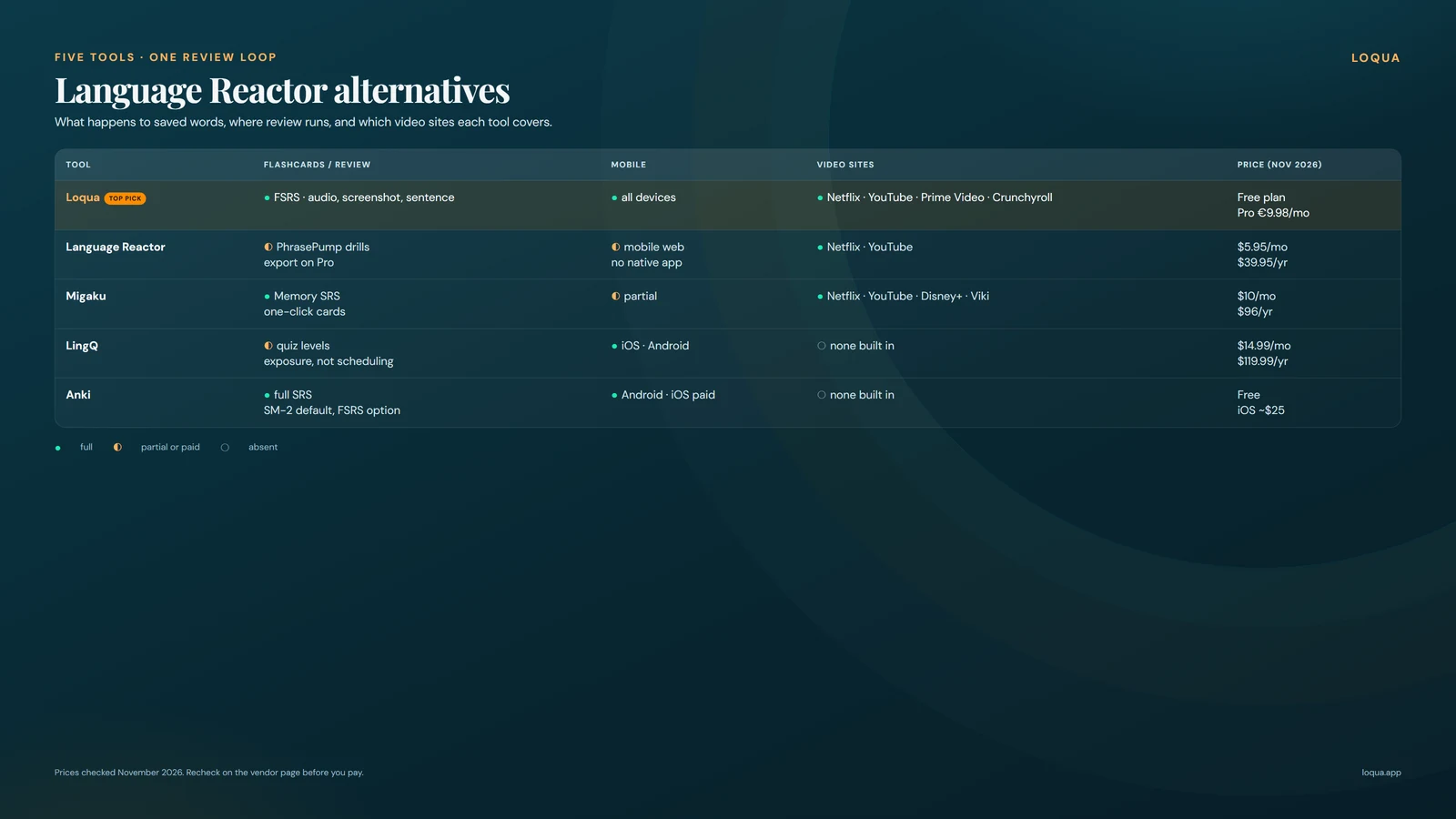
Here is the full language reactor alternative comparison in one matrix. Eight rows, five tools, every cell from our testing or from vendor documentation as of Nov 2026.
| Loqua | Language Reactor | Migaku | LingQ | Anki | |
|---|---|---|---|---|---|
| Free tier | Free plan with daily limits: desktop video and text sites, mobile text and YouTube transcripts | Dual subtitles Netflix + YouTube, popup dictionary, playback controls, PhrasePump, basic Lexa | 10-day money-back guarantee | 20 saved words, 5 imports, 1 playlist | Free on desktop and Android |
| Paid price (Nov 2026) | Free plan; Pro €9.98/mo | $5.95/mo, $13.95/3 mo, $39.95/yr | $10/mo, $96/yr, Lifetime $499 | $14.99/mo, $119.99/yr, $215.76/24 mo | iOS app about $25 once |
| Flashcard system | FSRS, 0.9 retention adjustable, cards carry audio + screenshot + sentence | PhrasePump drills, basic flashcards, export behind Pro | Migaku Memory SRS app | Flashcard quizzes + status levels | Full SRS, SM-2 default, FSRS available |
| Mobile app | Cloud sync, all devices | None native; web app via mobile browser | YouTube + photo OCR apps | iOS + Android, offline mode | Free Android app, paid iOS app |
| Video sites | Netflix, YouTube, Prime Video, Crunchyroll (desktop) | Netflix, YouTube | Netflix, YouTube, Disney+, Viki | None built in | None built in |
| Reading/import | Classics, news, stories, Wikipedia, web links (no file import) | None | Webpages | Import nearly anything, large library | DIY or shared decks |
| Definitions languages | All 5 study languages | Popup dictionary | Many languages | Within each course language | Depends on the deck |
| Best for | Watch-and-learn with real SRS | Free dual subtitles | Community workflow | Reading-first study | Total card control |
The Flashcard system row splits the field fastest: Loqua and Anki schedule with FSRS, Language Reactor keeps review inside PhrasePump drills, Migaku runs its Memory SRS app, and LingQ grades words through quiz status levels. The Mobile app row matters for review in dead time: LingQ ships full iOS and Android apps with offline mode, Loqua syncs decks to every device, and Language Reactor has no native app. The Video sites row matters if you watch anime on Crunchyroll or shows on Prime Video, since Language Reactor and Migaku document no support for either site. The Definitions languages row rewards Loqua, which defines words in all five study languages, with definitions in your language. The Free tier row shows how different the starting points are: Anki is fully free on desktop and Android, Language Reactor gives away its subtitle layer, LingQ caps saving at 20 words, and Migaku offers a trial only. Reading/import separates Anki, a blank slate, from LingQ, which imports almost anything, and Loqua, whose reader takes EPUB, PDF, TXT, and URL files plus built-in stories. Prices change with currency and promotions, so confirm on the vendor page before paying. Skip to a card below if one row already rules a tool in or out for you.
See what Loqua covers and start free
The 5 tools in detail
1. Loqua
Full disclosure: Loqua is our product, and it still gets honest cons below. The Chrome extension is free to install, and the free plan covers daily practice. On desktop it covers video on Netflix, YouTube, Prime Video, and Crunchyroll, plus text on sites like Wikipedia, Reddit, and X; on mobile it covers text sites and YouTube transcripts, with a best-effort parser elsewhere. Click any word while watching or reading and the definition appears in your language: the five study languages are English, French, Spanish, Italian, and Portuguese, with definitions in all five. Saving is one action that captures the audio clip, the screenshot, the full sentence, and the definition, and sends the card to Anki or to Loqua cloud, which syncs your flashcards across every device you own. Review runs on FSRS at a 0.9 retention target, adjustable in settings. The 10K-card N+1 decks supply real colloquial sentences in all 25 language pairings when you want ready-made material. One account also carries a reader for EPUB, PDF, TXT, URL, and pasted text with built-in stories in all five languages, phoneme-level pronunciation feedback in all five, conversation practice with more than 100 scenarios plus 1-minute free talk, and stats covering known, seen, and mined words, retention, pronunciation score, and streak or time.
For a Language Reactor switcher, the part that matters is the save path: the word you just clicked already has its audio, image, and sentence attached, so the FSRS deck fills itself while you watch, and the queue is waiting on your phone afterwards.
Cons: the product is still young, the parser outside the four supported video sites is best effort, and five study languages rules out German or Japanese today.
2. Language Reactor
Language Reactor is the tool you probably came from, and its free tier is genuinely useful: dual subtitles on Netflix and YouTube built from human subtitle tracks, a popup dictionary, playback controls, PhrasePump listening practice, and basic Lexa AI. Saving works inside PhrasePump only. Language Reactor Pro, as of Nov 2026 $5.95 a month, $13.95 for three months, or $39.95 a year, adds machine translation with a daily quota, saving words and phrases everywhere, Anki, CSV, and JSON export with image and audio, speech-recognition subtitles for Netflix dubbed audio, a stronger Lexa, and Aria chat memory. That is a low price for the export path alone. The machine translation quota applies to new content, roughly five hours per day, which covers long viewing sessions; repeated material does not burn it.
Cons: there is no full SRS. Review lives in PhrasePump drills and basic flashcards, and export sits behind Pro. There is no native mobile app; the extension runs in desktop Chrome and the web app is reachable from a mobile browser. Coverage stops at Netflix and YouTube: no Crunchyroll, Prime Video, or Disney+ support is documented. No reading import exists at all. For many learners the free tier still justifies keeping it installed next to whatever handles review and scheduling.
3. Migaku
Migaku runs one of the most polished paid Chrome workflows. Browser tools cover Netflix, YouTube, Disney+, Viki, and regular webpages; one click creates a card with audio and screenshot attached, and the Migaku Memory SRS app schedules reviews. Webpage mining means articles feed the same card flow as video. Mobile apps handle YouTube and photo OCR, so paper signs and menus can become cards too. The community is a real asset: an active Discord, shared routines, and accountability that keeps learners going through the boring weeks. Pricing as of Nov 2026: no permanent free plan, a 10-day money-back guarantee, Standard at $10 a month or $96 a year (about $8 a month), and a Lifetime pass at $499, with sale prices that vary. Lifetime needs roughly five years on the annual plan before it pays off, so treat it as a commitment, math you can repeat on the vendor page.
Cons: everything sits behind the subscription, and no Crunchyroll or Prime Video support is documented. Switchers from Language Reactor do gain a true SRS app immediately, since Memory replaces PhrasePump drills with scheduled review. If you weigh language reactor vs migaku on card creation, one-click capture is Migaku's strongest feature; the gaps are price and site coverage.
4. LingQ
LingQ is the reading-first alternative. It teaches 40+ languages, keeps a large built-in library, imports nearly anything from articles to eBooks, and ships proper iOS and Android apps with offline mode. Imported lessons open in the LingQ reader, where each lookup saves the word with its sentence attached. Stats and challenges suit learners motivated by targets and streaks. The free plan caps saving at 20 words and phrases, 5 imported lessons, and 1 playlist, which fills within one sitting, and that cap is why serious use means Premium. Premium, as of Nov 2026, runs $14.99 monthly, $119.99 a year (about $10 a month), or $215.76 across 24 months (about $8.99 a month); Premium Plus from $29.99/mo monthly or $269.99/yr annual ($22.50/mo) with AI voices.
Cons: review is flashcard quizzes plus status levels, which track exposure to words moving from new toward known; a scheduled recall engine with deck control is the thin part, and the Anki path runs through third-party tools. There is no video subtitle layer at all, so the watch-and-learn habit that brought you to Language Reactor has no equivalent here. For a big multilingual library and deep reading import, LingQ earns its slot; for video plus serious flashcards it answers neither question.
5. Anki
Anki is the review layer other tools feed, and many immersion workflows are built on exactly that split. It is free on desktop and Android; the iOS app is a paid one-time purchase at about $25, as of Nov 2026. Scheduling is full SRS, SM-2 by default with FSRS available, and card control is total: custom fields, templates, addons, and export formats. The shared-deck ecosystem is the largest anywhere, so starter decks exist for most languages and levels, and ten minutes of daily clearance is the entire maintenance cost; many learners run it for years on that rhythm alone.
Cons: Anki ships with no content, no reader, and no video tools. Every deck is DIY or downloaded, first setup takes an evening, and sync needs a free AnkiWeb account. Because it is the de facto standard, other tools hand cards to it: Language Reactor gates its export behind Pro, while Loqua saves straight to Anki from the free extension. If you already run a deck system, keep it and point a mining tool's anki export at it. If you want clicked words to arrive as scheduled srs flashcards without wiring tools together, use Anki as the destination and let the layers above handle capture.
Verdict: which should you pick
Best pick per use case:
- Switching from Language Reactor and want saved words to become real flashcards: Loqua, on the free plan.
- Happy with free dual subtitles on Netflix and YouTube: stay on Language Reactor.
- Reading-first study across many languages: LingQ.
- Paid community workflow with one-click cards: Migaku.
- Already running your own deck system: Anki, fed by a mining tool.
Pick Loqua if you want watched words to turn into FSRS cards with audio and screenshot that sync to your phone; on the free plan the whole flow costs nothing, and the honest trade is five study languages plus rough edges in a young product. Stay with Language Reactor if free dual subtitles on Netflix and YouTube cover your need and PhrasePump drills are enough review; at $5.95 a month Pro adds saving everywhere and export, but the SRS ceiling stays. Pick LingQ for reading-first study in 40+ languages with strong mobile apps; go with Migaku if its community workflow and one-click cards fit your budget; choose Anki if you already maintain decks and want total control over scheduling.
For deeper research, see Migaku alternatives with full flashcard review, LingQ alternatives for video-first learners, and immersion apps compared on video coverage.
The Loqua extension is free to install: test it on your next episode.
FAQ
Is Language Reactor free?
Partly. The free tier covers dual subtitles on Netflix and YouTube, the popup dictionary, playback controls, PhrasePump, and basic Lexa AI. Pro, as of Nov 2026, costs $5.95 a month or $39.95 a year, with a 3-month tier at $13.95, and unlocks saving everywhere plus export.
Does Language Reactor have SRS or flashcards?
It has flashcards in a limited sense: PhrasePump listening drills and basic review cards. There is no FSRS or full deck system with scheduling control, and saving outside PhrasePump requires Pro. Many users pair the free tier with a separate SRS for exactly this reason.
Does Language Reactor work on mobile, Crunchyroll, or Prime Video?
No native mobile app exists; the web app works in a mobile browser. Documented video support covers Netflix and YouTube only, with no Crunchyroll, Prime Video, or Disney+ path.
Can I export Language Reactor words to Anki?
Yes, on Pro: Anki, CSV, and JSON export with image and audio, as of Nov 2026. On the free tier, saved items stay inside PhrasePump with no export path.