
Comparison 9 min read
Five Migaku alternatives, one of them free
The best migaku alternatives turn shows, videos, and articles into flashcards you review later. This roundup compares five tools: Loqua, Migaku, LingQ, Language Reactor, and Anki. Disclosure: this roundup is published by Loqua. One option here has a free plan.
The best migaku alternatives turn shows, videos, and articles into flashcards you review later. This roundup compares five tools: Loqua, Migaku, LingQ, Language Reactor, and Anki. Disclosure: this roundup is published by Loqua. One option here has a free plan. What is the best Migaku alternative? Loqua is the best free-plan all-round pick among migaku alternatives because its Chrome extension covers Netflix, YouTube, Prime Video, Crunchyroll, and text sites, defines words in five study languages, and saves cards with audio and screenshot to Anki or Loqua cloud. Migaku suits committed Anki miners who want structured courses.
Start free with the Loqua extension and mine your first scene tonight.
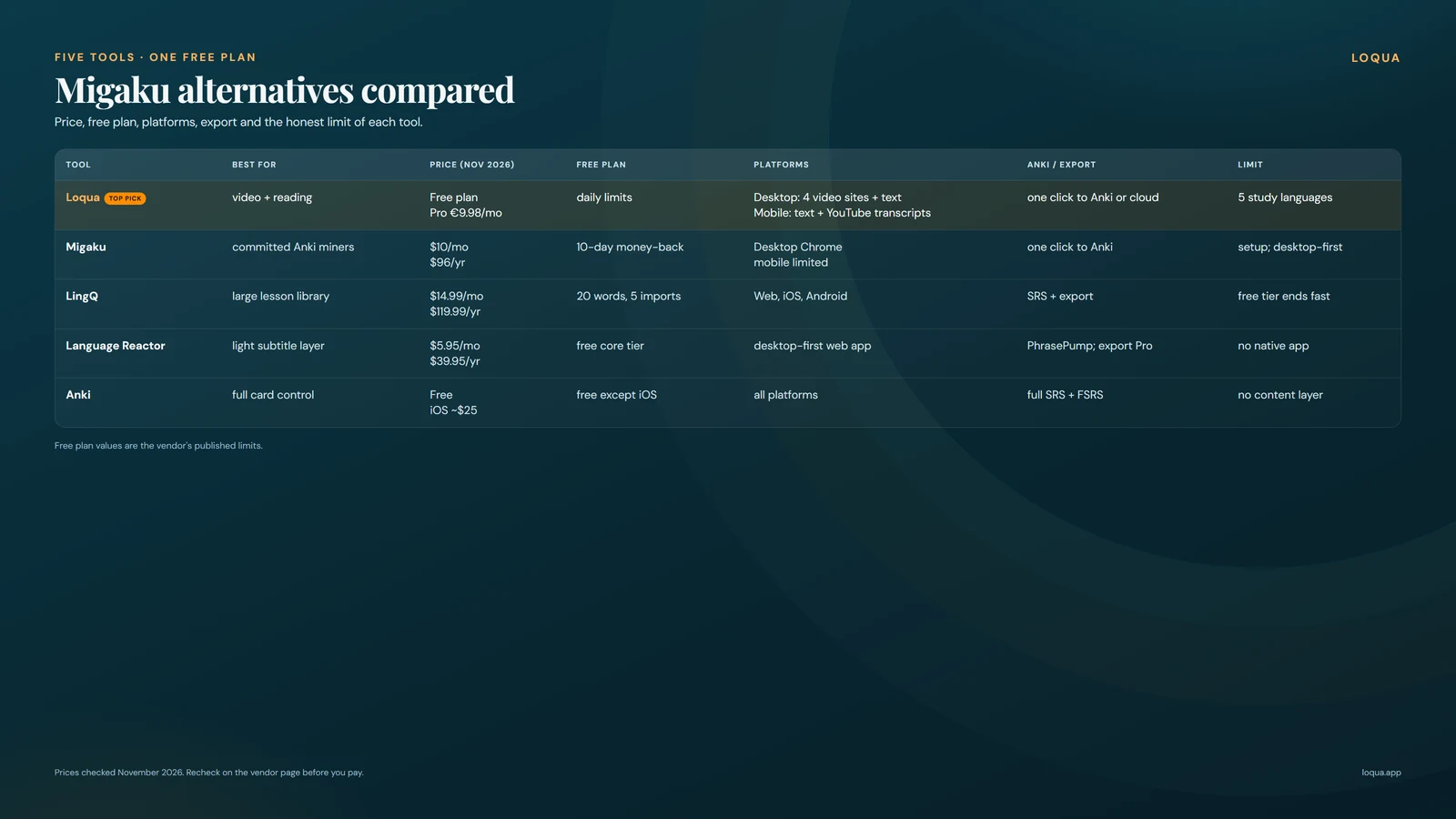 Five tools side by side on price, free tier, platforms, and export.
How we ranked these Migaku alternatives
We scored each tool on five practical points. The goal is to match the tool to your study habit, with attention to migaku pricing pressure.
Price and free tier: what the tool costs per month or year, and what you can do without paying. Migaku pricing sets the baseline here, since several readers arrive asking if a free plan exists. Platform coverage: which services work for study, including Netflix, YouTube, web text, and mobile access. Flashcard workflow: how fast you go from an unknown line to a reviewable card, whether saves include audio and screenshot, and how strong the spaced repetition system is. Setup effort: time from install to first saved card, plus account, app, and deck setup. Language coverage: number of study languages and depth of word parsing, dictionary entries, and subtitle handling.
Prices below were checked on vendor sites. Treat every price as of Nov 2026 and recheck before you pay.
Migaku alternatives compared (table)
Use this matrix to pick a tool in under a minute. Details and trade offs follow in the cards.
Prices verified Nov 14, 2026. Recheck quarterly.
| Tool | Best for | Price as of Nov 2026 | Free tier | Platforms | Anki/export | Standout limit |
|---|---|---|---|---|---|---|
| Loqua | Free-plan video plus reading miner | Free plan; Pro €9.98/mo, as of Nov 2026 | Free plan with daily limits | Desktop video: Netflix, YouTube, Prime Video, Crunchyroll; text: Wikipedia, Reddit, X; mobile text plus YouTube transcripts | One-click to Anki or Loqua cloud with audio, screenshot, sentence | Five study languages; desktop-first video |
| Migaku | Committed Anki miners who want courses | Standard $10/mo or $96/yr, as of Nov 2026 | Money-back only, no free plan | Desktop Chrome extension for video and web; mobile support limited | One-click cards with audio and screenshot to Anki | Setup overhead; desktop first |
| LingQ | Readers who want a large lesson library | Premium $14.99/mo monthly, as of Nov 2026 | 20 saved words and 5 imports | Web, iOS, Android; imports for articles, ebooks, YouTube | Built-in SRS plus export options | Free tier ends fast; busy interface |
| Language Reactor | Casual show watchers who want a light layer | Pro about $6/mo, as of Nov 2026 | Free core tier on Netflix and YouTube | Desktop Chrome on Netflix, YouTube; web app on mobile, no native app | PhrasePump review; export behind Pro | Review is lighter than FSRS; export needs Pro |
| Anki | Control seekers who tune every card | Free desktop and Android; iOS app paid, as of Nov 2026 | Free except paid iOS app | Windows, Mac, Linux, Android, iOS, web sync | Full card control with FSRS scheduling | No content layer; manual setup |
The 5 best Migaku alternatives
These five cover the main ways people study with shows and texts. The list below restates each pick in one phrase for quick scanning.
- Loqua: free-plan all rounder for video plus reading.
- Migaku: mature miner with courses for Anki users.
- LingQ: library first reader with word tracking.
- Language Reactor: light free subtitle layer for shows.
- Anki: free SRS engine that pairs with any miner.
1. Loqua
Verdict: the free-plan all-rounder for learners who want video and reading in one language learning Chrome extension. Best for: learners studying EN, FR, ES, IT, or PT who want to learn languages with Netflix and articles without paying on the free plan.
Pros:
- The free extension covers desktop video on Netflix, YouTube, Prime Video, and Crunchyroll, plus text sites including Wikipedia, Reddit, and X.
- Click any word for a definition in your study language, with all five supported languages covered.
- One-click saves carry sentence, show audio, and screenshot to Anki or Loqua cloud, synced across devices. See Anki export.
- Study loop includes 10K-card N+1 decks with real colloquial sentences across all study language pairs, FSRS scheduling with 0.9 retention target adjustable, built-in reader for classics, news, stories, Wikipedia and web links, phoneme pronunciation feedback in all five languages, 78 scripted conversation scenarios (French today) including bank, restaurant, and pharmacy plus 1-minute free talk, and stats for known, seen, mined, retention, pronunciation score, streak, and time. See built-in reader.
Cons:
- The extension is young, so some sites and player updates still need fixes.
- Study path covers five languages (EN FR ES IT PT), so learners outside that set need another tool.
- Video mining is desktop first. Mobile covers text plus YouTube transcripts only.
Price: the extension is free to install, as of Nov 2026. Saving runs on the free plan; Pro raises the daily limits.
Install the free extension and save five lines from one episode.
2. Migaku
Verdict: the seasoned pick for learners who already live in Anki and want guided courses next to mining. Best for: video miners who study daily, accept setup work, and want a large support community. Many apps like migaku copy the surface workflow without matching its parsing depth.
Pros:
- Mature mining workflow with one-click cards that keep audio and screenshot from shows and web pages.
- Strong Japanese parsing depth plus Academy courses for structured study between immersion sessions.
- Large Discord community with shared decks, setup help, and workflow examples.
- Flexible card templates for learners who tune fields, note types, and review settings.
Cons:
- No usable free plan. Access requires a paid plan; the first 10 days carry a money-back guarantee.
- Standard plan costs $10/mo or $96/yr, as of Nov 2026. Check the official Migaku pricing page before purchase: https://www.migaku.com/pricing
- Setup overhead stays real. Extension, app, language packs, and Anki connection take time before the first smooth session.
Price: Standard $10/mo or $96/yr, as of Nov 2026. Verify current tiers on the vendor site.
3. LingQ
Verdict: the library pick for readers who want lessons, imports, and word tracking in one place. For migaku vs lingq, LingQ wins on reading volume while Migaku wins on one-click video cards. Best for: learners who read daily, import articles and ebooks, and study on phone and desktop.
Pros:
- Large lesson library with brand trust, 40+ languages, and level guidance across reading and listening.
- Imports for articles, ebooks, and YouTube transcripts, plus known-word tracking that shows progress across texts.
- Full mobile apps for study away from the desk, with playlists and offline options on paid tiers.
- Built-in review system tied to saved phrases and vocabulary status levels.
Cons:
- Free tier stops at 20 saved words and 5 imports, which active readers pass in days.
- Premium costs $14.99/mo monthly, as of Nov 2026. Check the official LingQ pricing page: https://www.lingq.com/en/accounts/signup/
- Interface feels busy. New users face many menus, filters, and lesson types before reading starts.
Price: Premium $14.99/mo monthly, as of Nov 2026. Lower annual rates exist on the vendor site and change often.
Readers who want more reading first options can check LingQ alternatives.
4. Language Reactor
Verdict: the lightest way to add dual subtitles and quick lookups to nightly viewing. For migaku vs language reactor, Reactor wins on simplicity and free access while Migaku wins on card creation depth. Best for: casual show watchers who want help following the plot without building a full study system yet.
Pros:
- Free core tier works on Netflix and YouTube with dual subtitles, click lookup, and subtitle navigation.
- Simple install in Chrome with a short path from install to first lookup.
- Huge user base, so setup guides and subtitle issue threads are easy to find.
- Low friction for learning languages with Netflix on nights when full mining feels heavy.
Cons:
- No FSRS or deck scheduler. Review lives in PhrasePump, and export sits behind Pro.
- Pro costs about $6/mo, as of Nov 2026. Check the official Language Reactor pricing page: https://www.languagereactor.com/
- There is no native app or TV app; the web app works in a mobile browser.
Price: Pro about $6/mo, as of Nov 2026. Free core remains usable for basic dual subtitle study.
For a deeper Reactor comparison, see Language Reactor alternatives.
5. Anki
Verdict: the free SRS engine for learners who want full control and pair it with a mining tool. Best for: control seekers who tune scheduling, share decks, and review daily on desktop or Android.
Pros:
- Free and open source on desktop and Android, with FSRS scheduling for long term retention.
- Full card control: fields, templates, tags, filtered decks, and shared decks.
- Pairs with any miner. Loqua, Migaku, and Language Reactor exports all land well in Anki.
- Sync across devices through AnkiWeb, with a long record of stability.
Cons:
- No content layer. You still need shows, texts, or shared decks as input.
- Manual setup takes time, from note types to scheduler settings.
- Interface looks dated next to newer apps, which slows first week adoption.
Price: free on desktop and Android; iOS app paid, as of Nov 2026. Check the official Anki site for current iOS pricing and docs: https://apps.ankiweb.net/
Verdict: which Migaku alternative fits you
Video miners who want free access start with Loqua. The extension covers shows and reading, saves cards with audio and screenshot, and reviews with FSRS on the free plan.
Committed miners who live in Anki and want courses choose Migaku. The paid plan adds mature parsing, Academy lessons, and community support.
Readers who want a lesson library choose LingQ. Imports, mobile apps, and word tracking fit high volume reading plans. For broader context, see immersion apps compared.
Casual show watchers who want the lightest free layer choose Language Reactor. Dual subtitles and quick lookups help nightly viewing without setup depth.
Control seekers who tune every field choose Anki alone or paired with a miner above. It remains the most flexible review engine in this set.
Get the free extension and test one episode against your current tool.
FAQ
Is there a free Migaku alternative? Yes. Loqua offers a Chrome extension that is free to install, with the free plan covering daily practice on Netflix, YouTube, Prime Video, Crunchyroll, and text sites, plus one-click saves to Anki or Loqua cloud. Language Reactor also offers a free core tier for Netflix and YouTube lookups, while LingQ limits free use to 20 saved words and Anki is free except the paid iOS app.
How much does Migaku cost? Migaku Standard costs $10/mo or $96/yr, as of Nov 2026. Verify current tiers on the official Migaku pricing page before purchase, since plans and annual discounts change. There is no free plan; the first purchase carries a 10-day money-back guarantee.
Does Migaku work on mobile? Migaku focuses on desktop Chrome for mining, with limited mobile support. Learners who study mainly on phones often pair a reader like LingQ or a mobile friendly miner with Anki, or use Loqua for mobile text plus YouTube transcripts and desktop for full video mining.
Which is better, Migaku or LingQ? Video miners usually prefer Migaku for one-click cards with audio and screenshot. Readers usually prefer LingQ for its lesson library, imports, and word tracking across 40+ languages. Budget seekers often start on Loqua's free plan, then add LingQ or Migaku when they need a library or courses.
Can I send words to Anki from these tools? Yes. Loqua, Migaku, and Language Reactor all support Anki paths, with Loqua and Migaku offering one-click cards that keep audio and sentence context. LingQ uses its built-in SRS first with export options. Anki itself works as the review engine behind any of these miners.